Open Source  ·  Self-hosted  ·  GDPR-ready  ·  Any LLM  ·  Auto-Sync

One Brain for your team and for your AI.
AI answers you can trust.

veilSense gives your team a private knowledge hub — collect everything in one place, let AI assistants search it without hallucinating, and run it on your own infrastructure with any LLM you choose.

Request Demo
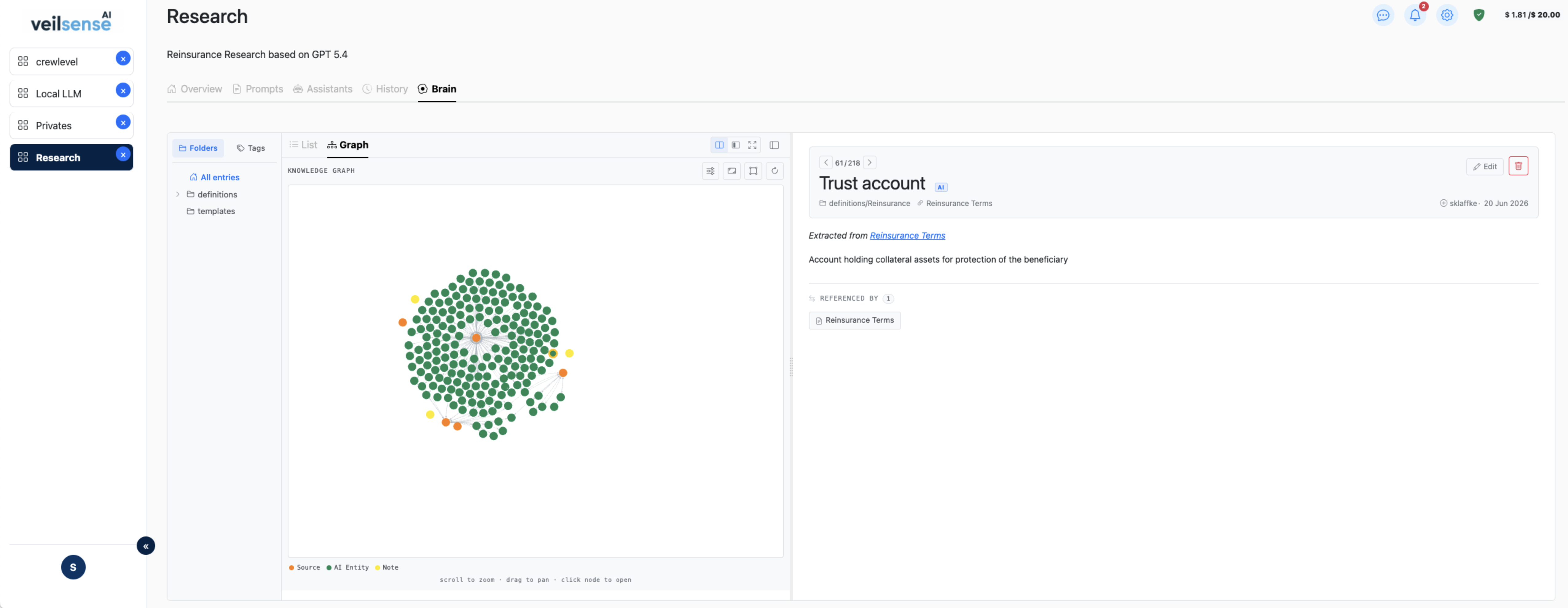
veilsense.company.local / brain
veilSense app screenshot
Why veilSense

The benefits that actually matter.

Built for teams that need AI to work on their terms — private, reliable, and fully in their control.

One place for everything your team knows
Collect chat responses, uploaded documents, research, meeting notes, and work results into a single searchable Brain. One source of truth — always up to date.
AI that answers from your data, not guesses
Assistants search your indexed Brain before responding. No hallucinations — every answer is grounded in content you control, not a language model's approximation.
Your LLM, your choice — including local models
Connect OpenAI, Claude, Gemini, or a local Ollama instance. Switch models per workspace without rebuilding anything. No vendor lock-in.
Live in minutes, not months
Pre-built assistants for Q&A, CV matching, data modelling, web research, and Confluence sync — ready to run from day one. No custom prompt engineering required to get started.
Open Source — just install with Docker
veilSense is fully open source. No license required — spin it up with a single Docker Compose command. The only costs are your own LLM API tokens and Tavily credits, billed directly by the provider.
Separate knowledge, restrict access
Organize teams, departments, or clients into isolated workspaces. Each workspace sees only what you allow — no cross-contamination, no accidental leaks.
Reuse your best prompts across the team
Build prompt templates once and share them within a workspace. Standardize how your team interacts with AI — consistent output, no duplicated effort.
Keep AI costs visible and under control
Set a monthly LLM budget per workspace with a warning threshold. A live indicator shows spend vs. limit, and admins are notified when the threshold is reached and when the budget is exceeded. Spend is calculated from a maintained model price list, so every chat, assistant, workflow and agent run has a cost you can trace — no billing surprises.
Know which model earns its cost
One system-wide model catalogue with encrypted keys. A usage map shows which models serve which actions in which workspaces, and compares their speed, tokens per second and cost per 1,000 tokens — local Ollama models included. Set a thinking level per model, and the price list keeps itself current: a weekly check reads the providers' price pages and proposes changes that you approve — nothing changes on its own.
An audit trail for everything your agents do
Every model call (prompt, answer, tokens, cost, thinking level and timing), every tool call, approval and policy decision of your agents and workflows is recorded. Open any row to see why an agent decided what it did, and export a tamper-evident, hash-chained bundle for your auditor. Retention is yours to set.
Keep your Brain current — automatically
Scheduled Research Assistant queries fetch and index web results via Tavily, Google, or Perplexity. Confluence and Notion Sync import your wikis. OneDrive, SharePoint, and Google Drive Sync import your files. Source Monitor watches URLs for changes. Paste any link and the crawler indexes the whole page tree — all stored back into Brain without manual effort.
Ask questions of your spreadsheets — exact numbers
Attach an Excel or CSV file and ask in plain language: totals per region, top customers, hours per person and month as a pivot, as a table or chart. The model only sees the columns and a short anonymized sample; the figures are calculated over every row, so they are exact. Download the result as Excel or save it to Brain — or run the same analysis inside a workflow.
A Brain that knows what is still true
An ontology of classes and typed relations gives your knowledge a shared structure, with AI suggestions you accept. Temporal facts track effective dates and propose when a newer statement replaces an older one — so answers stop quoting outdated figures.
Generate real documents, not slide soup
PowerPoint, Word, and Excel Generators fill your actual corporate templates — native tables, repeatable groups, and real numbers your formulas can total. On-brand output, not a generic AI layout.
A virtual team that does the multi-step work
Agents with roles and an org chart take a task, break it down, delegate among themselves, and bring you a finished deliverable — which always stops at a human review gate before it counts as done.
Chain assistants into workflows — with a human checkpoint
Wire assistants and prompts into a visual pipeline with conditions, loops, and aggregation. Add a Human-in-the-Loop step wherever automation shouldn't run unsupervised.
Platform

Inside veilSense.

Explore the core capabilities that make these benefits possible.

Collect everything.
Find anything instantly.

Brain is your team's central, single source of truth — and every assistant, generator, and workflow reads from it. Capture chat responses, documents, research, and results in one place, each clearly labeled AI or human, so answers always come from your real content, never from guesswork.

  • ✓
    Ingest documents, chat results, web pages, Confluence, and manual entries
  • ✓
    Source tracking — every entry carries a visible origin badge (AI-extracted, synced, or human-authored)
  • ✓
    Semantic search — find content by meaning across all sources at once
  • ✓
    Smart chunking — glossary tables are extracted term-by-term; long docs split for precision
  • ✓
    Real, readable documents — editable and exportable for people, semantically indexed for AI
  • ✓
    AI writing assistant backed by a Brain-grounded prompt, so suggestions stay specific to your content
  • ✓
    Draft autosave and full automatic version history — publish, revert, or discard, nothing is lost
  • ✓
    PII review gate — sensitive content can require sign-off before it becomes searchable knowledge
  • ✓
    Confidential entries hide personal notes from teammates; AI-Excluded entries never touch any AI model at all — two independent, combinable controls
🔍 "data privacy GDPR obligations" 4 matches
📋
GDPR Data Processing Policy
Confluence · 98% match
🌐
EU AI Act — Compliance Guide 2026
Web · Research Assistant · 91% match
📄
Privacy Glossary — Key Terms
Document · 47 terms extracted · 88% match
🤖
Legal Q&A — DPA obligations summary
AI · Brain Q&A · 82% match

Start immediately.
No prompt engineering needed.

veilSense ships with pre-built assistants you can point at your workspace and run right away. No custom LLM setup, no weeks of fine-tuning — just pick an assistant and go.

  • ✓
    Brain Q&A — questions answered from your indexed knowledge, never from guesswork
  • ✓
    Research Assistant — scheduled web queries via Tavily, Google, or Perplexity, results auto-stored in Brain
  • ✓
    Confluence Sync — import your Confluence Cloud page tree into Brain with change tracking
  • ✓
    Notion Sync — import every page shared with a Notion integration into Brain
  • ✓
    Cloud Storage Sync — import OneDrive, SharePoint & Google Drive folders into Brain, sign in with Microsoft/Google or an app-only credential
  • ✓
    Source Monitor — watch URLs for content changes and notify your team automatically
  • ✓
    CV Matcher — rank candidates against your internal job profiles
  • ✓
    Data Model Assistant — inject live schema context into any prompt automatically
  • ✓
    Image Generator — creates on-brand images from a typed subject, using an admin-defined style template
  • ✓
    Tool Assistant — connect any MCP server and let the chat LLM call its tools directly
  • ✓
    Brain as an MCP server — plug Claude Code, Codex, or Cursor into your workspace Brain with a scoped access token; read for grounded context, write entries back through the PII gate, or pick up decomposed dev tasks (preview)
  • ✓
    PowerPoint, Word & Excel Generators — fill your real templates from a chat brief
🧠
Brain Q&A
Answers grounded in indexed Brain knowledge — no hallucinations
🔬
Research Assistant
Scheduled web queries via Tavily, Google, or Perplexity → Brain SOURCE entries, deduped by URL
📋
Confluence Sync
Imports Confluence Cloud pages into Brain; version-tracked with change summaries
◼️
Notion Sync
Imports every page shared with a Notion integration into Brain
☁️
Cloud Storage Sync
Imports OneDrive, SharePoint & Google Drive folders into Brain — sign in with Microsoft/Google, no client secret needed
👁
Source Monitor
Watches URLs for content changes; sends team notifications automatically
📑
CV Matcher
Ranks candidates against internal job profiles from Brain
🗄️
Data Model Assistant
Injects live database schema context into any prompt automatically
🎨
Image Generator
On-brand images from a typed subject, via ComfyUI or OpenAI
🔌
Tool Assistant
Connects to any MCP server — the chat LLM calls its tools live, on demand
🧠
Brain as an MCP server
Claude Code / Codex / Cursor connect with a scoped token — read context, write entries back, or work the dev task board (preview)

Real documents.
Not slide soup or copy-paste.

Upload the PowerPoint, Word, or Excel template your team already uses. veilSense fills it with AI-authored content that lands in real shapes, native tables, and real numbers — a document your design and finance teams would sign off on, not a generic wall of AI text.

  • ✓
    PowerPoint Generator — visual canvas maps content onto your real template's shapes
  • ✓
    Native tables, repeatable groups, and diagrams — never a screenshot pretending to be a table
  • ✓
    Word Generator — fills .docx templates with AI text, native tables, and diagrams
  • ✓
    Excel Generator — numeric cells written as real numbers so your formulas still total correctly
  • ✓
    Image Pool — generated and uploaded images deduplicated and reused, not re-embedded every time
📊
PowerPoint Generator
Visual block-mapping canvas · native tables · repeatable groups · diagrams
📄
Word Generator
AI-authored text, native tables, and diagrams filled into your .docx template
📈
Excel Generator
Multi-sheet aware, numeric-flagged cells your existing formulas can total
🖼️
Shared Image Pool
Content-hash deduplication across every generated document

A team of AI agents.
Reporting to a real person.

Set up agents with defined roles, an org chart, and a lead. Give them a task and they break it into sub-tasks, claim the ones that match their expertise, ask each other for what they're missing, and escalate to a person when a step needs human judgement. Every deliverable stops at a review gate before it counts as done.

  • ✓
    Task board — a task is decomposed into a dependency graph of sub-tasks, each assigned to an agent or a person; from a re-usable template or the LLM
  • ✓
    Initiatives and roadmaps — group tasks into epics across teams, with a timeline, dependencies that gate the work, lead-to-lead coordination, LLM spend per initiative, and AI-drafted plans you review before anything is applied
  • ✓
    Agent-to-agent delegation — a stuck specialist asks a teammate or the lead before it ever interrupts you
  • ✓
    Human review gate on every deliverable — approve, or reject with a reason and the work rewinds and re-runs
  • ✓
    Per-team policies — moderation OFF / FLAG / BLOCK on input and output, denied capabilities, local-models-only, prohibited topics, step and tool-call caps
  • ✓
    Third parties in the work content are anonymized before any agent LLM call — teammates and @mentions never are
  • ✓
    Agents draft emails and Brain entries; a person approves before anything is sent or published
  • ✓
    One living Brain entry per task collects every sub-task's output; generated .docx/.pptx attached
  • ✓
    Multiple teams per workspace, each exportable as a bundle and importable elsewhere
TASK · Prepare the Q3 partner offer
🤖
Gather inputs & assets
Research agent · done
✓
🤖
Draft the offer content
Writer agent · in progress
●
👤
Review & approve
Waiting on you
@Writer → @Research: I still need the signed scope — can you pull it?

Chain your assistants.
Keep a human in control.

A visual DAG canvas wires any assistant or prompt into a real pipeline — with conditions, loops, and aggregation. And when a step shouldn't run unsupervised, a Human-in-the-Loop node pauses the run and waits for someone to actually review it.

  • ✓
    Drag-and-drop DAG canvas chaining any assistant or workspace prompt
  • ✓
    Conditions, Decision Tables, Calculate, and Aggregate steps for real control flow
  • ✓
    Loop steps run a nested sub-workflow per item, arbitrarily nested
  • ✓
    Classify step — a small decision model sorts text into your own labels with a confidence score, then a Condition routes on the result; runs on a local model, no cloud LLM call needed
  • ✓
    Human-in-the-Loop — pause for review; reject rewinds and re-runs with the reason attached
  • ✓
    Triggers — cron schedule, manual, a new email in a watched mailbox, or an upcoming/ended calendar event
  • ✓
    Side-effect steps — send email, write a Brain entry, create a board task, add a calendar event — with full per-step execution history
START
→
Research Assistant
→
👤 HITL Review
→
END

A shared calendar
that briefs you and writes it up.

Every workspace has a calendar — team task deadlines, scheduled jobs, and your own events, recurring or one-off, all in one place. Point a scheduled workflow at it and veilSense prepares a briefing before each meeting and drafts the minutes after.

  • ✓
    Workspace calendar — task due-dates, cron jobs, and manual events on one FullCalendar view
  • ✓
    Recurring events — daily, weekly, monthly series with a redesigned event editor
  • ✓
    Appointment scheduling — define providers, rooms, and equipment with their own business hours, then find and book an open slot across them in one click, no double-booking
  • ✓
    Book from a workflow too — a Find Slot step searches the same resources and feeds a found opening straight into a calendar event, hands-free
  • ✓
    Calendar-triggered workflows — a run fires for each upcoming event (look-ahead) or each just-ended one (look-back), de-duplicated so a meeting is never processed twice
  • ✓
    Pre-meeting briefing — a workflow searches Brain and linked documents and delivers a briefing before the meeting starts
  • ✓
    Post-meeting minutes — from your linked notes and a prompt template, written straight into Brain
  • ✓
    Chat agents can read the calendar; only a granted workflow step writes to it — the same rule as email
🔍
Find slot — 30 min, Dr. Smith + a room
Booked → Tue 14:00–14:30 · Room 2
📅
Partner sync — Q3 planning
Tomorrow · 10:00–11:00 · weekly
⏰ T‑2h→Briefing workflow
📄 Briefing: Partner sync — Q3 planning
Last quarter's actions, open risks from Partner Program, and the two decisions still pending — pulled from Brain.
after end→Minutes workflow→ Brain

Your Brain stays current
while you focus on work.

Connect external knowledge sources once and let veilSense keep Brain up to date on a schedule. No manual imports — new and changed content is discovered, extracted, and indexed automatically.

  • ✓
    Research Assistant — periodic web queries via Tavily, Google, or Perplexity on any topic, results land in Brain
  • ✓
    Confluence & Notion Sync — import your Confluence page tree or every page shared with a Notion integration; only re-imports changed pages
  • ✓
    Cloud Storage Sync — import OneDrive, SharePoint & Google Drive folders into Brain automatically
  • ✓
    Source Monitor — watch any URL for content changes; an AI-written summary of what changed lands right in that page's version history
  • ✓
    URL Chip in chat — paste a link to crawl and index a full site into Brain in one click
  • ✓
    Every sync connector tracks history — Confluence, Notion, Cloud Storage & Source Monitor all attach change summaries to version history, with one notification carrying the actual summary text
🔬
Research Assistant
Scheduled web queries via Tavily, Google, or Perplexity → Brain SOURCE entries, deduped by URL
📋
Confluence Sync
Imports page tree from Confluence Cloud; version-tracked, labels → tags
☁️
Cloud Storage Sync
Imports OneDrive, SharePoint & Google Drive folders into Brain
👁
Source Monitor
Watches URLs for changes; AI summary attaches to version history, team gets notified
🔗
URL Chip / Web Crawler
Paste any URL in chat → crawl same-domain pages (depth 1–3) → Brain

Keep sensitive data out
of the LLM — automatically.

veilSense detects and strips PII before any prompt reaches a language model. Choose from four anonymization modes — fully automatic or human-reviewed — with a persistent replacement map that restores real identities in AI responses.

  • ✓
    Auto PII masking — names, emails, phone numbers stripped before every LLM call
  • ✓
    Four anonymization modes — Auto, Review-all, or Dictionary-only; per workspace
  • ✓
    Document PII gate — review and approve detected entities before a file enters Brain
  • ✓
    Workspace isolation — each team's knowledge is strictly separated
  • ✓
    Encrypted storage — results, API tokens, and chat threads encrypted at rest
  • ✓
    Tamper-evident activity log — every agent and workflow action recorded in a hash-chained timeline
  • ✓
    Agent guardrails — input/output moderation (flag or block), denied capabilities, and per-team topic limits
AUTO_ALL
REVIEW_ALL
AUTO_DICT
DICT_ONLY
ORIGINAL
Dear Anna Müller, contact john@acme.com at Acme GmbH regarding the +49 172 555 0199 inquiry.
↓ anonymized before LLM call
SENT TO LLM
Dear [PERSON_1], contact [EMAIL_1] at [ORG_1] regarding the [PHONE_1] inquiry.

Reusable prompts.
Any LLM. Full history.

Build prompt templates once and reuse them across your workspace. Run them against any LLM — including local Ollama models. Every conversation is stored, resumable, and encrypted.

  • ✓
    Prompt templates — write once, reuse across the whole workspace
  • ✓
    Any LLM — OpenAI, Claude, Gemini, or a local Ollama model
  • ✓
    Persistent threads — full history, resumable context, encrypted at rest
  • ✓
    Ad-hoc chat — quick answers without setting up a thread
  • ✓
    Voice Mode — a real spoken conversation: continuous listening with auto-send on silence, barge-in to interrupt, and sentence-by-sentence replies that start before the answer even finishes generating; local Whisper speech-to-text and your own text-to-speech backend, nothing leaves your infrastructure
  • ✓
    Export any answer — ask for a Word doc, PDF, or Excel file and get a download link right in the reply, no template required
  • ✓
    Data analysis for Excel & CSV — attach a large table and ask in plain language (filter, group, sum, top 10, chart); the model sees only the structure and an anonymized sample, the calculation runs on your real rows inside veilSense, then export to Excel or save to Brain
  • ✓
    One-click memory compaction — condense a long-running thread into a summary to keep context costs down, without losing the visible history
Brain Q&A
Chat
History
What are our GDPR obligations for the new customer portal?
👤
🧠
Based on your GDPR Data Processing Policy and EU AI Act summary in Brain: appoint a DPO, maintain a ROPA, obtain explicit consent, and add a right-to-erasure workflow to the portal.
📚 Sources: GDPR Policy (Confluence) · EU AI Act (Web)
Save this answer to Brain
👤
➤
How it works

Up and running in three steps.

Deploy in an afternoon. Start getting value the same day — no AI expertise required.

1

Build your Brain

Add documents, write entries, and import existing content. veilSense indexes everything automatically — your team's knowledge becomes instantly searchable.

2

Pick your LLM and assistants

Connect any model — OpenAI, Claude, or a local Ollama instance. Enable the pre-built assistants that fit your team's workflows and start using them immediately.

3

Get reliable answers — privately

Ask questions and run assistants. Every response is grounded in your indexed Brain content. PII is masked automatically, and nothing leaves your server.

Your knowledge. Your Privacy.
Your infrastructure.

AI that works entirely on your terms — self-hosted, open source, and free to run. No vendor, no lock-in, no data leaving your walls. Just your team, your knowledge, and an AI that finally answers from truth.